Showing posts with label local search. Show all posts

Thursday, August 21, 2008

More on Google Local Search

As I recently discussed, we have decided to use Google Local Search rather than Google Geocoding (well, rather than a hybrid approach) for whereyougonnabe. That post got some interesting comments, including one from Pamela Fox of Google who said that Local Search will soon be using Tele Atlas data (rather than NAVTEQ according to one of the other posts, though she didn't say that explicitly), and the implication was that this was the same source data as the Google Geocoder. One would hope that this may mean that they are bringing the two services together, which would be a lot nicer for users. I also ran into Martin May from Brightkite yesterday at the Techstars investor day (which was excellent) and he mentioned that they are making the same move, which was interesting - it turned out we had been looking at a lot of common issues at the same time.

Anyway, I thought I would follow up with a little more discussion on some of the benefits we see of using Google Local Search, as well as some outstanding issues. One aspect that I really like is that you can give it a search point to provide context, and this is very useful for our application. We are especially leveraging this in our calendar synchronization. A typical (and recommended) way of using the system when you are traveling is to create a high level activity saying that, for example, you are in New York City for four days next week, and then subsequently enter more specific activities for those days. When you add an activity in your calendar, we look at the location string in the context of where we think you are on that date. So for example, if I just said I was having lunch at 1100 Broadway, it would locate me at 11 Broadway in New York during those four days, or at 1100 Broadway in Denver if I was at home. And as I discussed in the previous post, the feature we like most about Local Search is that you can search for business names, and again these take that location context, which makes it very easy to specify many locations. Some examples that I have used successfully at home in Denver include "Union Station", "Vesta Dipping Grill" (or just "Vesta"), "Enspiria" (a company where I have an advisory role"), and even "Dr Slota" (my dentist). It's very convenient to be able to use names like this rather than having to look up addresses.

So that's great, but there are still a few issues. One is that Local Search really doesn't work well for airports - if you enter a 3 letter airport code it is very hit or miss whether it finds it. I'm pretty sure this used to work a lot better, though I haven't tracked down specific tests to prove that. But we plan to do our own handling of this case (unless we see an improvement really soon), using geonames (which we already use for locating airports in our tripit interface, but we haven't hooked this into our general geocoding).

I reported over a year ago that I felt there were some issues with Google Local Search on the iPhone, so I thought it would be interesting to revisit some of the same problem areas I reported on then. These problems generally revolved around local search being too inclusive in the data it incorporates, which is good in terms of finding some sort of result, but the risk is that you get bad data back in some cases. Given the good results I had found in my initial testing this time round, I expected that I would probably see some improvement, so I was a little surprised to find that in general most of the same problems were still there. You can see these by trying the search terms in Google Maps (and in MapQuest for comparison).

My test cases were as follows, centered around my home at 1792 Wynkoop St, Denver:
  • King Soopers (a local supermarket chain): last time in the top 10 on Google, there were three entries with an incomplete address (just Denver, CO), all of which showed as being closer than the closest real King Soopers, and there was one (wrong) entry which said it was an "unverified listing". This time, there was just one incomplete address like this, so that was a definite improvement, but unfortunately this appeared top of the list so the closest King Soopers was not returned as the "best guess" from the local search API. There were two other bogus looking entries in the top 4, for a total of 3 apparently bad results in the top 10. On MapQuest, 10 legitimate addresses are returned, though in some cases they appear to have multiple addresses for the same store (e.g. entry points on two different streets) - but this is not a serious error as you would still find a King Soopers. This was the same as last time. I tried typing "King Soopers Speer" (the name of the street where the store is located) and that returned me the correct location as the top result.
  • Tattered Cover (a well known Denver book store with 3 locations). MapQuest returns just 3 results, all correct. Google Maps returns 9 entries in its initial list, of which three have incomplete addresses (duplicates of entries which do have complete addresses, but they show up at entirely different locations on the map), one is a store which closed two years ago, and one is a duplicate of a correct store. The old store does say removal requested, but it seems surprising that this closed two years ago and is still there.
  • Searches for Office Depot and Home Depot were more successful, with no obvious errors - hooray :) !! This was the same as last time.
  • Searching for grocery in Google Maps online last time returned Market 41, a nightclub which closed a year before, and four entries with incomplete addresses. This time there were only two which looked bad (including the King Soopers with an incomplete address we saw before). The same search on MapQuest had one incomplete address, the rest of the results looked reasonable. So a definite improvement in this case.
So in summary, Google showed a little improvement over last year but not a huge change - they still could use some more quality control to remove bad data entries. But as I've discussed, overall we've obtained very good results for our application needs, so we are looking forward to rolling out the new Local Search based capabilities shortly.

Wednesday, August 13, 2008

Google Local Search better than Google Geocoding?

Google offers two (apparently) unrelated solutions for doing geocoding (converting a text string into a latitude-longitude and a structured address): the Google Geocoding API (which is part of the Google Maps API) and the Google Local Search API (which has JavaScript and non-JavaScript variants). This post discusses our experiences with both and the results of recent testing we have been doing, which has led us to a decision to switch from our current hybrid approach to using only local search.

Initially we were attracted to using Google Local Search for whereyougonnabe, as it lets you search for places of interest like "Wynkoop Brewing Company" or "Intergraph Huntsville", rather than having to know an address in all cases - whereas the geocoding API only works with addresses.

However, in our initial testing with local search we found a number of cases where it returned a location and address string successfully, but did not properly parse the address into its constituents correctly (for example, returning a blank city). For our application it was important to be able to separate out the city from the rest of the address. In our initial testing, the geocoding API seemed to do a better job of correctly parsing out the address. In addition, it returned a number indicating how accurate the geocoding was (for example street level or city level). So we ended up implementing a rather ugly hybrid solution, where we first used local search to allow us to search for places of interest in addition to addresses, and then passed the address string which was returned to the geocoding API to try to structure it more consistently. In most cases this was transparent to the user, but in a number of cases we hit problems where the second call would not be able to find the address returned by the first call, or where the address would get mysteriously "moved". With so much to do and so little time :) we elected to go with this rather unsatisfactory solution to start with, but I have recently been revisiting this area, and doing some more detailed testing of the two options.

Before I get into more details of the testing, I should just comment on a couple of other things. One is that a key reason we are revisiting our geocoding in general is that we recently introduced the ability to import activities from external calendar systems, which means we need to call geocoding functionality from our server from a periodic background process, whereas before that we just called it from the browser on each user's client machine. This is sigifnicant because the Google geocoding API restricts you to 15,000 calls per IP address per day, which is not an issue at all if you do all your geocoding on the client but quickly becomes an issue if you need to do server based geocoding. Interestingly, Google Local Search has a different approach, with no specified transaction limits (which is not to say that they could not introduce some of course, but it's a much better starting point than the hard limit on the geocoding API).

Secondly, a natural question to ask is whether we have looked at other solutions beyond these two, and the answer is yes, though not in huge detail. Most of the other solutions out there do not have the ability to handle points of interest in addition to addresses, which is a big issue for us. Microsoft Virtual Earth looks like the strongest competitor in this regard, but it seems that we would need to pay in order to use that, and we need to talk to Microsoft to figure out how much, which we haven't done yet - and obviously if we can get a free solution which works well we would prefer that. Several solutions suffer from lack of global coverage and/or even lower transaction limits than Google. We are using the open source geonames database for an increasing number of things, which I'll talk about more in a future post, but that won't do address level geocoding and points of interest are more limited than in Google (currently at least).

Anyway, on to the main point of the post :) ! I tested quite a variety of addresses and points of interest on both services. Some of these were fairly random, a number were addresses which specific users had reported to us as causing problems in their use of whereyougonnabe. In almost all the specific problem cases, we found that the issue was with the geocoding API rather than local search. The following output shows a sample of our test cases (mainly those where one or other had some sort of problem):

I=Input, GC=geocoding API result, LS=local search API result, C=comments

I: 1792 Wynkoop St, Denver
GC: 1792 Wynkoop St, Denver, CO 80202, USA
LS: 1792 Wynkoop St, Denver, CO 80202
C: LS did not include country in the address string returned, but it was included separately in the country field. The postcode field was not set in LS, even though it appeared in the address string. Other fields including the city and state (called "region") were broken out correctly. This was typical with other US addresses - LS did not set the zip code / postal code, but otherwise generally broke out the address components correctly.

I: 42 Latimer Road, Cropston
GC: 42 Latimer Rd, Cropston, Leicestershire, LE7 7, UK
LS: null
C: The main case where GC fared better was with relatively incomplete addresses, like this one with the country and nearest large town omitted (Cropston is a very small village)

I: 72 Latimer Road, Cropston, England
GC: 72 Latimer Rd, Cropston, Leicestershire, LE7 7, UK
LS: 72 Latimer Rd, Cropston, Leicester, UK
C: Both worked in this case, with slight variations. GC included the postal code (a low accuracy version) and LS did not. LS included the local larger town Leicester which is technically part of the mailing address.

I: 8225 Sage Hill Rd, St Francisville, LA 70775
GC: null
LS: 8225 Sage Hill Rd, St Francisville, LA 70775
C: One of several examples from our users which didn't work in GC but did in LS.

I: Wynkoop Brewing Company Denver
GC: null
LS: 1634 18th St, Denver, CO
C: As expected, points of interest like this do not get found by GC

I: Kismet, NY
GC: Kismet Ct, Ridge, NY 11961, USA
LS: Kismet, Islip, NY
C: Another real example from a user, where GC returned an incorrect location about 45 miles away from the correct location, which was found by LS.

I: 1111 West Georgia Street, Vancouver, BC, Canada
GC: 1111 E Georgia St, Vancouver, BC, Canada
LS: 1111 W Georgia St, Vancouver, BC, Canada
C: Another real example from a user which GC gets wrong - strangely it switches the street from W Georgia St to E Georgia St, which moves the location about 2 miles from where it should be.

I: London E18
GC: London, Alser Strafle 63a, 1080 Josefstadt, Wien, Austria
LS: London E18, UK
C: Another real user example. London E18 is a common way of denoting an area of London (the E18 is the high level portion of the postcode). GC gets it completely wrong, relocating the user to Austria, but LS gets it right.


So in summary, in our test cases we found a lot more addresses that could not be found or were incorrectly located by the Google Geocoding API, but were correctly located by Google Local Search, than vice versa. It is hard to draw firm conclusions without doing much larger scale tests, and it is possible that there is a bias in our problem cases as our existing application may have tended to make more problems visible from the Geocoding API than from Local Search (it is hard to tell whether this is the case or not). But nevertheless, based on these tests we feel much more comfortable going with Local Search rather than the Geocoding API, especially given its compelling benefits in locating points of interest by name rather than address. These point of interest searches can also take a search point, which is also a very useful feature for us, which I will save discussion of for a future post. Advantages of the geocoding API are that it returns an accuracy indicator and generally returns the zip/postal code also, neither of which are true for Local Search. Neither of these were critical issues for us, though we would really like to have the accuracy indicator in local search also. For our application we are not too concerned about precisely how the addresses align with the base maps - one reason I have heard given in passing for Google having these two separate datasets is that they want a geocoding dataset which uses the same base data as Google Maps uses, to try to ensure that locations returned by geocoding align as well as possible with the maps. If this is a high priority for your application, you might want to test this aspect in more detail. It also appears that the transaction limits are more flexible for server based geocoding with Local Search.

So we'll be switching to an approach which uses only Google Local Search in an upcoming release of whereyougonnabe. I'll report back if anything happens to change our approach, and I'll also talk more about what we're doing with geonames relating to geocoding in a future post.

Tuesday, July 3, 2007

Local search on Microsoft Local Live

Steve Lombardi from Microsoft emailed me about the local search issues I raised in regard to Google Maps on the iPhone (and other mobile platforms) in my earlier post. In that post I compared the results I got with Google to those I got from MapQuest - I would have tried Microsoft Local Live also, except I had been under the mistaken impression that it didn't work on my Mac ... turns out it doesn't work with Safari (you get a very scaled back site which is pretty useless), but it works fine with FireFox (for 2D stuff - Virtual Earth in 3D, and Photosynth, are actually the things I miss most in Mac land so far!). So I was pleased to discover that I can at least use the 2D stuff still.

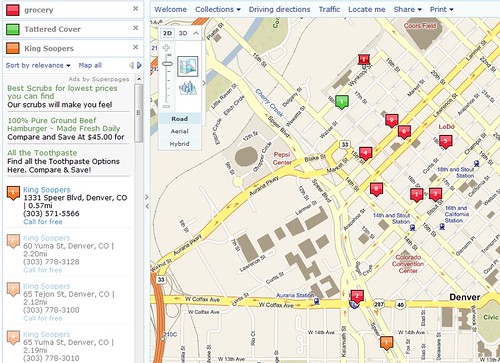
Local live search example

Steve had tried the same tests I did on Local Live, and I tried them for myself and it fared well. With luck, this live link will give you more or less the same thing as the screen shot above. I ran several tests in my previous review, all centered on 1792 Wynkoop St, Denver, CO. For full details see the earlier post, but I'll summarize the earlier results here too. These were the test searches and the results I got with Local Live:
  • King Soopers (a local supermarket chain): Google returned 4 non-existent results in the top 10; Microsoft and MapQuest both had no errors but some duplication, in the sense of having multiple addresses close by for the same store. M&M both correctly located the closest store but Google didn't (unless you count manually discarding results with incomplete addresses)
  • Tattered Cover (a well known Denver bookstore with 3 locations): Google returned 4 non-existent results in a list of 8, while M&M both returned only the 3 correct store locations.
  • Office Depot and Home Depot seemed to work fine with everyone, with no obvious errors.
  • A search for grocery yielded 4 out of 10 incorrect results on Google and 10 reasonable looking results on MapQuest (though I didn't verify them all). With Microsoft the top result was incorrect, an incomplete address which just said "Denver, CO", similar to those which caused a lot of the errors with Google. And the second address on the list was interesting - it was Cowboy Lounge, which is a nightclub which used to be Market 41, which appeared on the Google list also, incorrectly categorized as a grocery store (you can understand how the mistake occurred given the original name). Interesting that Microsoft picked up the name change, which Google didn't, but still has the incorrect categorization. However, one good thing with Microsoft is that I was given the option to provide feedback that the result was incorrect, so I did that and asked this it should be removed from the grocery categories (and I provided feedback on the previous incorrect result too). The rest of the list appeared to be legitimate establishments, though the Rocky Mountain Chocolate Factory and Cookies by Design are a broad interpretation of "grocery" :) !! So Microsoft did better than Google but not as well as MapQuest on this one. I will be interested to see if and when my feedback on the incorrect categorization gets through the system, I will check it out every so often to find out!
So overall, both Microsoft and MapQuest appear to have much better quality in their points of interest data than Google does (admittedly based on a fairly small sample). As I said previously, as consumers start to use location based services more, data quality will be a really critical factor in end user satisfaction. Your system might have the coolest user interface in the world, but by the second or third time it has taken you to a non-existent location, I can pretty much guarantee that you will switch to something less sexy but with more reliable data. This is a scenario where false positives (returning a location of interest which does not really exist) are in general much worse than false negatives (not returning a real location of interest). If I'm desperate for a beer and you direct me to a bar which is two miles away but ignore one which is one mile away, at least I get my beer pretty promptly (though I would have been happier if I could have walked). But if you take me to several nonexistent locations first and I hunt around at each one for a while to try to find the bar which is supposed to be there, I will be thirsty and grumpy and resolving to find a new LBS to help me next time :).

A couple of other quick observations on the Microsoft Local Live implementation. One is that it lets you place a pin at your original location of interest, and also display pins in different colors showing multiple different query results at the same time - this feature is nicely done and not available in Google either online or mobile. The results include some ads, but these are clearly separate from the result listing. The results come back sorted in order of "relevance", which I think is probably in most cases a euphemism for "more or less by distance, but with scope to move sponsored results further up the list" - which is what Google appears to be doing with its mobile maps as I discussed previously. But with one click I can change this to sort by distance, and on both these lists it shows the distance of each result from my starting point. As a user I am quite happy with this approach - it gives the service provider (Microsoft) the chance to monetize their service with ads and preferred placement, which ultimately is necessary otherwise service providers won't be able to continue to provide their service, but it doesn't hamper my ability to easily get the specific information I want (as Google Maps Mobile does).

Steve tells me that the same local search capabilities are available in Microsoft Live Search for mobile ... but unfortunately there's not much chance of me testing that any time soon, as I am already suffering enough abuse over having both an iPhone and a BlackBerry 8800, so I don't think I can justify adding a Windows-based smartphone to the collection :) !!