Showing posts with label release. Show all posts

Sunday, October 12, 2008

New whereyougonnabe release, including support for Fire Eagle and GeoRSS

This week we added quite a number of new capabilities to whereyougonnabe, including support for Fire Eagle and GeoRSS, substantially expanded help documentation, improved synchronization capabilities, support for SMS, and exclusive use of Google Local Search in the whereyougonnabe browser application, as discussed previously (having introduced this approach for external sync in the previous release). For more detail on the new functionality from a user perspective see the whereyougonnabe blog - I'll touch on aspects of this here, but also discuss a little more of the technical background.

As most readers of this blog probably know, Fire Eagle is a service from Yahoo that is essentially an independent location broker supported by a number of applications which use location. You can sign up for free, and authorize applications to update and/or read your location. In the case of whereyougonnabe, we update your location automatically based on the plans you have told us about in advance. So for example, if you are using our Tripit interface, just by forwarding a single email with your itinerary, we will update your location throughout your trip, indicating the airports and cities you are in.

I really like our new RSS feed capability, which lets you easily view data from whereyougonnabe from outside the application, for example in web home pages like My Yahoo or iGoogle. The following is an example:
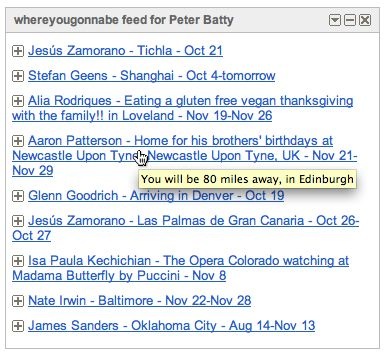
whereyougonnabe RSS feed

The content of the feed uses a similar algorithm to the one we use for WYTV, with a somewhat random mix of activities from your friends which will close to you, and some which won't. While a major focus of the system is of course identifying opportunities to meet friends, another important aspect is just keeping in touch with your friends. This is similar to using Facebook status or Twitter, but we have more information about an activity, including its location and time, which lets us select "interesting" items more effectively (for example, activities further from home will probably be more interesting than those close to home, in general).

You can click through on any element in the RSS feed to see more details in whereyougonnabe:
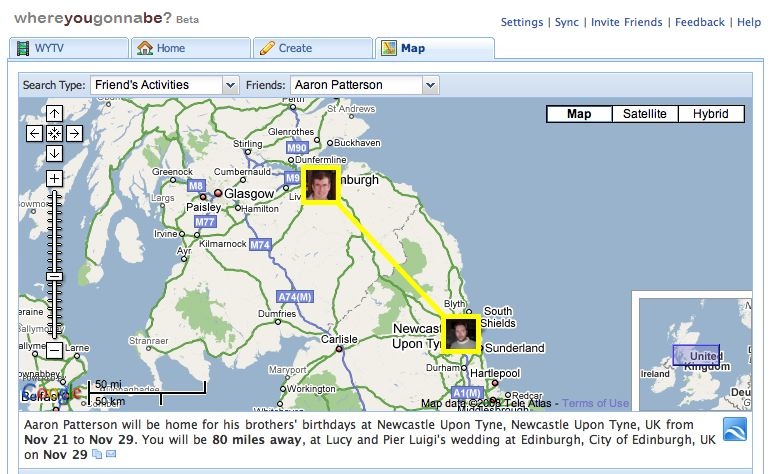
whereyougonnabe RSS feed clickthrough to map

This ability to link directly to a specific activity in whereyougonnabe is new with this new release. We now use these links in various places where you see data outside whereyougonnabe, including Facebook status and newsfeeds, Twitter messages, and iCal feeds. People will only be able to see the details if they are authorized to do so (i.e. typically if they are your friend on Facebook). We see this as an important development in terms of integration with other systems, and in encouraging people to use whereyougonnabe more often.

As I mentioned above, the RSS feed is actually a GeoRSS feed, so you can display elements on a map in software which supports GeoRSS, such as Google Maps (just copy the feed URL into the search box):
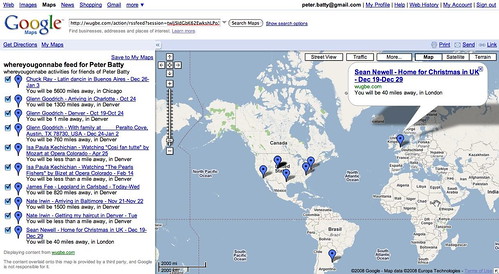
whereyougonnabe GeoRSS feed

Lastly, we have made various enhancements to the synchronization capabilities, including a sync on demand capability which gives you feedback on what is happening with the sync, which is helpful in confirming that it is working as expected, and/or diagnosing any problems.

There are several other functional improvements in the release too - as I mentioned, you can read more about these at the whereyougonnabe blog.

Thursday, September 4, 2008

New release of whereyougonnabe

We are pleased to announce another new release of whereyougonnabe.

Some key features include:
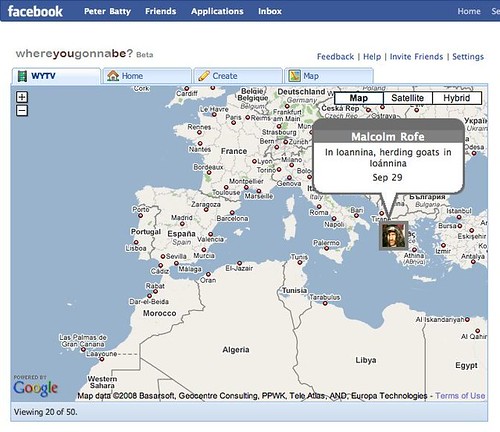
  1. WYTV, a new animated map display inspired by the cool Twittervision, but using data from whereyougonnabe. This displays an interesting mix of activities from your friends and public activities from other users. You can click through on friends’ activities to see more details.
  2. Calendar synchronization now uses Google Local Search, based on the context of which city you’ve told us you’re in. So if you’re in Denver, CO and you put a location of “1100 Broadway” or “Apple Store” on an activity in your calendar that week, it will find a suitable location in Denver.
  3. We now support display of distances in kilometers as well as miles, a request we have had from several users. If your home is in the US or UK the default setting is miles, elsewhere it is km. You can change your preference on the settings page.
  4. The experience for new users is improved – when you add the application you can immediately view data from your friends, or public activities from other users, without having to enter any data. Users just need to tell us their home location before creating their own activities. There is more to come on this theme.
  5. Various small usability improvements and bug fixes.
wytv Screenshot

As always, we welcome your feedback on the new features, and ideas for further improvements. We will have another new release coming very shortly with a number of things that didn’t quite make it in time for this one. You can try the new release here.

Sunday, July 13, 2008

Major new release of whereyougonnabe

Apologies again for the lack of posting recently ... a primary reason for this has been we have been heads down adding lots of new stuff to whereyougonnabe recently, plus I've been juggling a number of side projects. But anyway, we are excited about our latest release which went live over the weekend (you can access it here). 

The big theme of the release is integration - we can now automatically import activities from Google Calendar, Tripit, and Dopplr, we have added an iCal feed so you can view whereyougonnabe information in your regular calendar, and you can set your Facebook and/or Twitter status whenever an activity begins. In general, a big challenge with future location is how to create data as easily and automatically as possible, and this is a big step forward in that regard.

We also made significant changes to the way that we calculate interactions and decide what to notify you about, which I have come to realize is a very hard problem, as I have got more into this (which is good, as it is harder for other people to copy what we are doing).

You can read more specific information at our whereyougonnabe blog, or watch the following video for an overview of the new features:


whereyougonnabe July 2008 release overview from Peter Batty on Vimeo.

We also have several more detailed videos explaining how to set up and use the new features. Our big focus for the next release is on the user interface, an area where we have a lot of ideas and plans that we are excited about.